Free QR menu for restaurants
Create a free QR menu without sending guests to a PDF.
Start with 15 menu items and 1 QR code. Import your PDF, photo, CSV, or text menu, review the draft, then publish a phone-friendly menu you can update anytime.
Free plan essentials
Everything a small restaurant needs to test QR menus properly.
Editable menu, not a static file
Guests see a clean mobile menu while your team keeps prices, photos, sold-out items, and descriptions current from the dashboard.
Start from the menu you already have
Use a PDF, menu photo, CSV, pasted text, or manual entry. FlipMenu gives you a practical first draft you can review before publishing.
1 QR code included
Print your first table, counter, receipt, or window QR code without paying first.
15 items free
Enough for a cafe menu, drinks list, specials board, or a focused launch menu.
Update anytime
Change the live menu without touching the printed code.
Scan analytics
See if guests are actually opening the menu before you expand.
How it works
Publish a useful QR menu in three controlled steps.
This page is built for operators who want speed without losing control. Import quickly, verify the details, then print a QR code that keeps working.
Import your current menu
Upload a PDF, menu photo, spreadsheet, or paste text. Start with what is already on your wall, website, or print file.
Review the draft
Check item names, prices, descriptions, categories, and availability before guests can scan anything.
Publish one QR code
Print the QR code once. Future edits update the hosted menu behind that same code.
Product preview
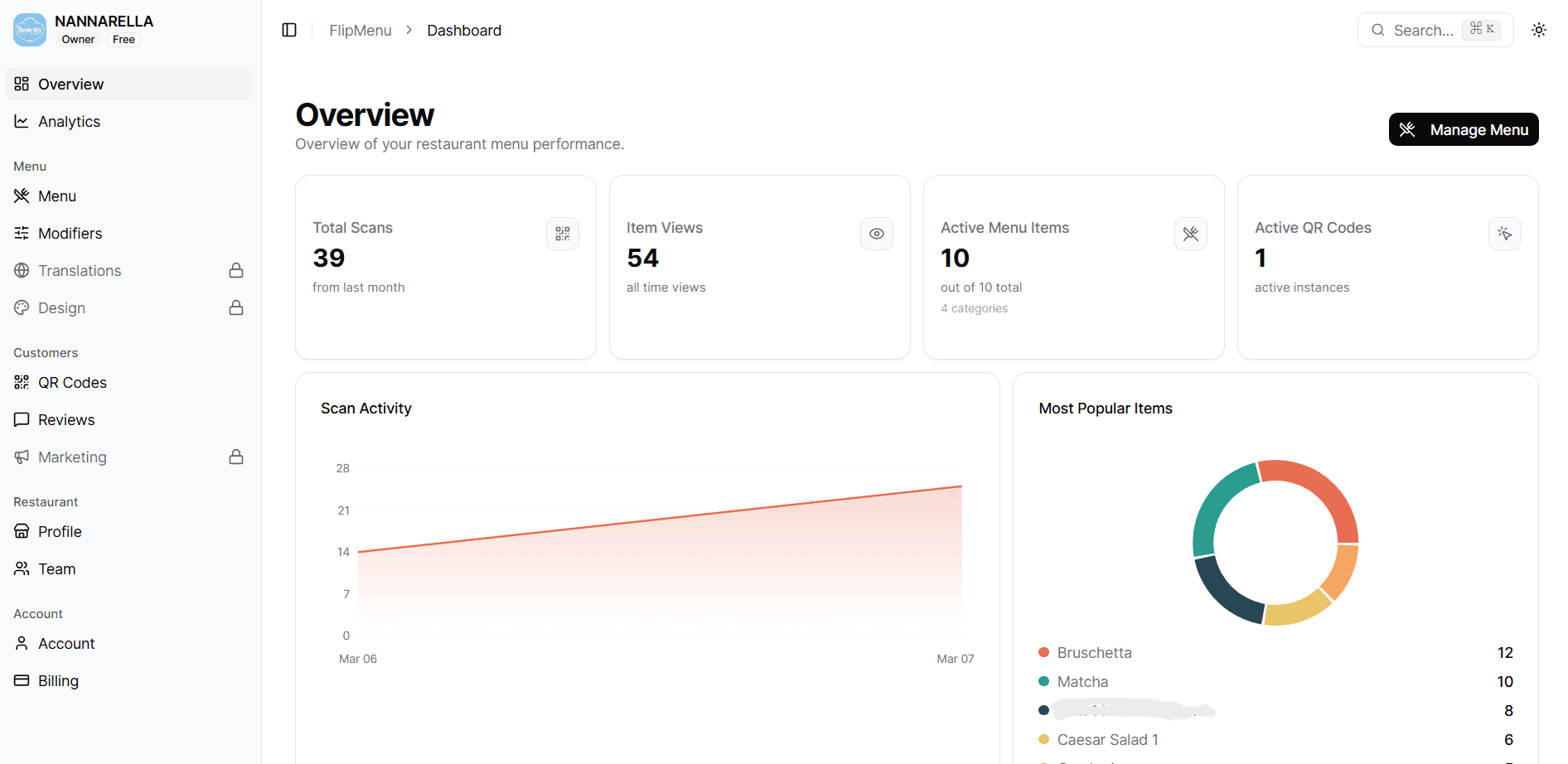
Manage the menu guests scan.
The dashboard is where the restaurant keeps the menu current. The guest page reads from that same menu, so the printed QR code does not need to change.
Guest menu
Guests see the menu as a fast mobile page.
No PDF viewer, no app install, and no separate file to replace every time the kitchen changes a price or removes an item.
Why not just link a PDF?
A QR code is only as good as the page behind it.
FlipMenu gives guests a live menu experience instead of a hard-to-read static file.
Good first use cases
Use the free plan where a compact live menu already solves a problem.
Cafes
Launch a compact breakfast, pastry, or drinks menu without a print run.
Restaurants
Test QR menus with core items before moving the full menu over.
Bars
Keep cocktail, wine, happy hour, and specials lists current.
Food trucks
Change items fast when stock, events, or locations change.
Specials boards
Publish a focused seasonal or lunch menu with one scannable code.
Pricing path
Start free. Upgrade when the menu outgrows free.
Pro unlocks full menu publishing with QR, branding, analytics, translations, and team workflows.
Free
For testing a real QR menu before paying.
- 15 menu items
- 1 QR code
- Hosted mobile menu
- Basic scan analytics
- No credit card required
Starter
For small cafes with a compact QR menu.
- 50 menu items
- 1 QR code
- Customer reviews
- Dietary tags
- Basic scan analytics
Pro
Most restaurantsFor restaurants ready to publish their full menu with QR.
- Up to 300 menu items
- 5 QR codes
- Menu edits anytime
- Custom branding
- Menu analytics
Business
For growing restaurants and teams that need advanced controls.
- Everything in Pro
- Unlimited team members
- Unlimited QR codes
- Custom reports
- API access
FAQ
Questions before you print
The free plan is meant to be tested in a real restaurant, not just viewed as a demo.
Need the plan table instead? Compare all plans
Free plan
Is the free QR menu really free?
Yes. The Free plan includes up to 15 menu items and 1 QR code with no credit card required.
Do I need a credit card?
No. You can create the account, build the first menu, and publish the first QR code without adding card details.
What happens after 15 items?
Your menu stays in FlipMenu. Upgrade when you need more menu items, more QR codes, branding, translations, or advanced analytics.
Publishing
Can I update the menu without reprinting QR codes?
Yes. The QR code points to your hosted FlipMenu page, so price, photo, description, and availability edits appear behind the same printed code.
Can I start from a PDF or photo?
Yes. During onboarding you can start from a PDF, image, CSV, pasted text, sample menu, or manual entry.
Do guests need to install an app?
No. Guests scan the code with their phone camera and open the menu in the browser.
Need the plan table instead? Compare all plans